BruvTab: Terminal-driven tab control for Chrome power users and developers
BruvTab, created by Philipp Schmitt, is a Chrome extension that adds command-line tab management to the browser for terminal-centric workflows. It lets users list, activate, and close tabs from a terminal, enabling keyboard-driven navigation and integration with scripts instead of mouse-based control. As a fork of brotab, the extension exposes a CLI interface and keeps a lightweight footprint. Developers, system administrators, and power users who prefer keyboard-first routines gain tighter terminal-to-browser workflows.
What is BruvTab used for?
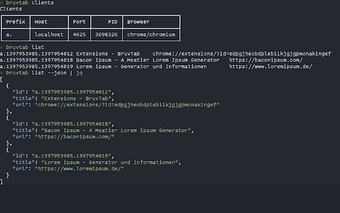
The extension provides direct terminal control of browser tabs, built as a fork of brotab to preserve a familiar CLI model. It exposes a command-line interface that performs tab operations without opening a graphical panel, so routine tab tasks are available to shell scripts. Common command-level actions include:
- listing open tabs with indices
- activating a tab by index or URL
- closing tabs from a script or alias
How much does it affect browser performance?
The developer describes the tool as lightweight with minimal impact on browser performance, which keeps visible overhead small during normal use. That lightweight approach avoids continuous UI injection and reduces background activity compared with extensions that run persistent content scripts. Users who keep many tabs open should see little change in UI responsiveness, making the extension suitable for long-running, keyboard-driven sessions.
Does BruvTab collect or share user data?
The developer's privacy disclosure on the Chrome Web Store states the extension does not collect or use any user data. Its open-source heritage as a brotab fork gives a transparent lineage for the code that handles commands. Users who prioritize data minimization have a concrete, documented claim to evaluate at install time by reviewing the extension's permissions and store listing.
How well does it integrate with terminal workflows and other browsers?
The extension integrates directly with terminal-based workflows, allowing aliases and automation that call tab commands from a shell. Compatibility is listed for Google Chrome and other Chromium-based browsers, enabling reuse across that browser family. This positioning makes the extension practical for developers and system administrators who prefer keyboard-only routines, while offering limited benefit to users who rely on graphical tab management or mouse-centric navigation.
A focused tool for terminal-first workflows, with clear trade-offs
BruvTab suits developers and administrators who accept command-line interaction as a primary interface; it requires command-line fluency and adds little for mouse-focused users. For practical setup, map frequently used operations to shell aliases or short scripts to reduce repetition. In short, the extension matches terminal-driven workflows well but remains intentionally niche in its audience and usage model.